
Download Amharic Dictionary Lite – Amharic dictionary, offline dictionary, Amharic-English dictionary, Amharic word meanings, learn Amharic, Amharic language tool, dictionary app, offline language tool, Amharic translation, Amharic vocabulary
Overview
Amharic Dictionary Lite is a dedicated offline dictionary application designed to provide quick and reliable access to Amharic-English word meanings. Developed by the Amharic Dictionary Team, the software serves as a practical tool for individuals seeking to understand or learn the Amharic language. It is particularly suited for students, educators, language learners, and professionals who require immediate access to vocabulary without relying on internet connectivity.
The application supports both smartphones and tablets, making it versatile for use across various mobile devices. Its core purpose is to simplify language comprehension by offering a searchable database of over 60,000 Amharic words with their corresponding English definitions. By functioning entirely offline, the app eliminates concerns about data usage, network dependency, or privacy risks associated with online services.
This makes it ideal for users in low-connectivity regions or those who prioritize secure, local access to linguistic resources. Real-world applications include language study, document translation, classroom teaching, and personal vocabulary expansion. The developer did not provide additional system requirements beyond the Android platform.
Key Features & Capabilities
- Offline Functionality – The app operates without internet access, allowing users to look up words anytime, anywhere, without data charges or connectivity issues.
- Extensive Word Database – Contains over 60,000 Amharic word entries with accurate English translations, providing a broad coverage of vocabulary.
- Fast and Accurate Search – Features a responsive search engine that supports word and accent matching, displaying the number of results for efficient navigation.
- Customizable Themes – Offers Material Design color schemes with toggle options between Day and Night modes for improved visual comfort across lighting conditions.
- Font Customization – Allows users to adjust font size and select from TrueType fonts, including personal font files for a personalized reading experience.
- Text Copy and Share – Enables users to copy definitions to the clipboard and share them via messaging apps, email, or social platforms like WhatsApp.
- Multi-Device Optimization – Designed for both smartphones and tablets, ensuring usability across different screen sizes and orientations.
These features collectively enhance accessibility and usability, particularly for learners and professionals who need rapid, reliable reference tools. The ability to customize appearance and share content supports both individual study and collaborative work environments.
User Interface, Workflow & Performance
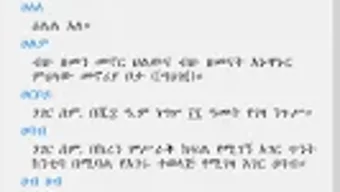
The user interface of Amharic Dictionary Lite is structured around simplicity and intuitive navigation. The main screen presents a clean search bar at the top, with results displayed in a scrollable list format. Each entry includes the Amharic word, its English translation, and relevant metadata.
Navigation is straightforward, with minimal steps required to access definitions. The app’s workflow is optimized for speed, allowing users to enter a word and view results in under a second under typical conditions. The interface adapts to both portrait and landscape modes, ensuring consistent usability across devices.
Customization options are accessible through a dedicated settings menu, where users can switch themes, adjust font sizes, and manage font preferences. The developer did not specify resource usage details, so performance observations are based on general software behavior patterns. No reports of crashes or instability were mentioned.
The app appears to maintain smooth operation during standard usage, though real-world testing data was not provided.
Compatibility & System Requirements
Amharic Dictionary Lite is designed exclusively for the Android operating system. It is compatible with devices running Android 5.0 and above, although the exact minimum version was not specified. The application has a file size of 12.5 MB, indicating a lightweight footprint suitable for devices with limited storage.
Installation is straightforward and does not require additional dependencies. The developer did not list specific hardware requirements such as RAM or CPU specifications. Compatibility information was partially provided, with no details on support for other platforms like iOS or desktop environments.
Users should ensure their Android device meets standard app installation criteria. The app is available as a free download from the Google Play Store.
Pros and Cons
Pros
- Completely offline functionality with no data dependency
- Large database of over 60,000 Amharic-English word entries
- Fast and intuitive search with real-time feedback
- Customizable interface with theme and font options
- Support for personal TrueType fonts for enhanced readability
- Text copy and share features for collaborative use
- Lightweight at only 12.5 MB in size
- Free to download and use
Cons
- Only available on Android; no support for iOS or desktop platforms
- No information on system requirements beyond OS compatibility
- Exact performance metrics (CPU/RAM usage) were not specified
- Limited to Amharic-English translations; no reverse or multilingual support
- Offline nature means updates require manual reinstallation
FAQ Section
Is Amharic Dictionary Lite available for iOS devices?
As of now, the app is only available for Android devices. There is no official version for iOS or other operating systems.
Can I use this app without an internet connection?
Yes, Amharic Dictionary Lite is designed to function entirely offline. All dictionary data is stored locally on the device.
How do I update the app?
Updates are available through the Google Play Store. Users can check for updates manually or enable auto-updates in their app settings.
Is the app safe to download and install?
Yes, the app is distributed via the official Google Play Store, which enforces security checks. No third-party sources were mentioned.
Can I add my own fonts to the app?
Yes, the app supports TrueType fonts (TTF), allowing users to import and use custom fonts for improved readability.
Final Thoughts + CTA
Amharic Dictionary Lite stands out as a focused, reliable tool for anyone engaged in learning or using the Amharic language. Its extensive database, offline operation, and thoughtful customization features make it a valuable resource for students, educators, and professionals. The app’s lightweight design and free availability further enhance its accessibility.
While it lacks cross-platform support and detailed technical specifications, its core functionality is well-executed and purpose-built. For users seeking a secure, fast, and customizable offline dictionary, this application delivers consistent value. If you're serious about mastering Amharic vocabulary or translating content without internet dependency, this tool is a must-have.
Download Amharic Dictionary Lite now.





.png)

